
| 일 | 월 | 화 | 수 | 목 | 금 | 토 |
|---|---|---|---|---|---|---|
| 1 | 2 | 3 | 4 | 5 | 6 | 7 |
| 8 | 9 | 10 | 11 | 12 | 13 | 14 |
| 15 | 16 | 17 | 18 | 19 | 20 | 21 |
| 22 | 23 | 24 | 25 | 26 | 27 | 28 |
- BOJ
- 그리디
- 인텔리제이
- Maven
- http파일
- AWS
- EC2
- IntelliJ
- 정렬
- 무인도 여행
- docker
- 신고결과목록
- 10989번
- 큰수A+B
- 백준
- NEXUS
- 1064
- 15829
- springboot
- 숫자 변환하기
- springdoc
- 도커
- 5430
- 프로그래머스
- 뒤에있는큰수찾기
- swapfile
- 별찍기-10
- sort
- repository url
- 좌표 압축
- Today
- Total
Time to lazy
IntelliJ + 스프링 부트 에서 코드 변경시 자동 재시작 본문
코드 변경 시 자동 재시작이 되도록 설정해봅시다
1. spring-boot-devtools 추가
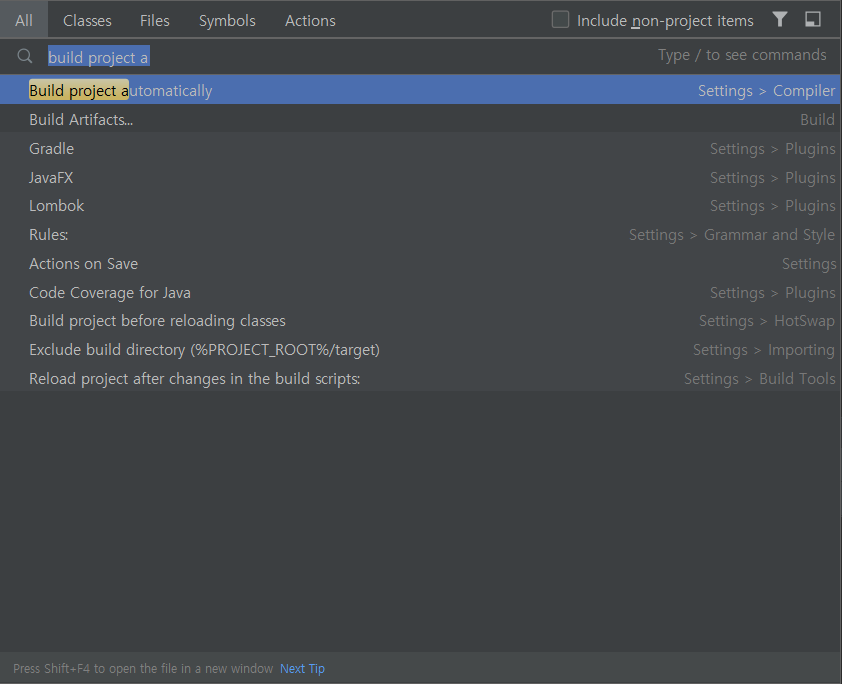
2. build project automatically 체크
3. Allow auto-make to start even if developed application is currently running 체크
1. spring-boot-devtools 추가
maven, gradle 마다 조금씩 다르므로 그냥 해당 링크를 찾아가 추가하자
https://mvnrepository.com/artifact/org.springframework.boot/spring-boot-devtools
Maven Repository: org.springframework.boot » spring-boot-devtools
Spring Boot Developer Tools VersionVulnerabilitiesRepositoryUsagesDate2.7.x2.7.1Central11Jun, 20222.7.0Central23May, 20222.6.x2.6.9Central5Jun, 20222.6.8Central14May, 20222.6.7Central26Apr, 20222.6.6Central19Mar, 20222.6.5Central10Mar, 20222.6.4Central13Fe
mvnrepository.com
--- Maven ---
<dependency>
    <groupId>org.springframework.boot</groupId>
    <artifactId>spring-boot-devtools</artifactId>
</dependency>

--- Gradle ---
implementation 'org.springframework.boot:spring-boot-devtools'
추가로 application.properties(.yml) 설정을
spring.devtools.livereload.enabled 값을 true를 설정을 해줘도 되는데 default 값이 true이므로 건너뛰겠음
2. build project automatically 체크
Settings > Build, Execution, Deployment > Build Tools > Complier > Build project automatically 체크

저거 따라가기 귀찮으니 쉬프트 2번누르면 검색기능이 활성화되는데 그곳에 build project automatically 검색하면 바로뜸
3. Allow auto-make to start even if developed application is currently running 체크
Setting > Advanced Settings > Allow auto-make to start even if developed application is currently running 체크
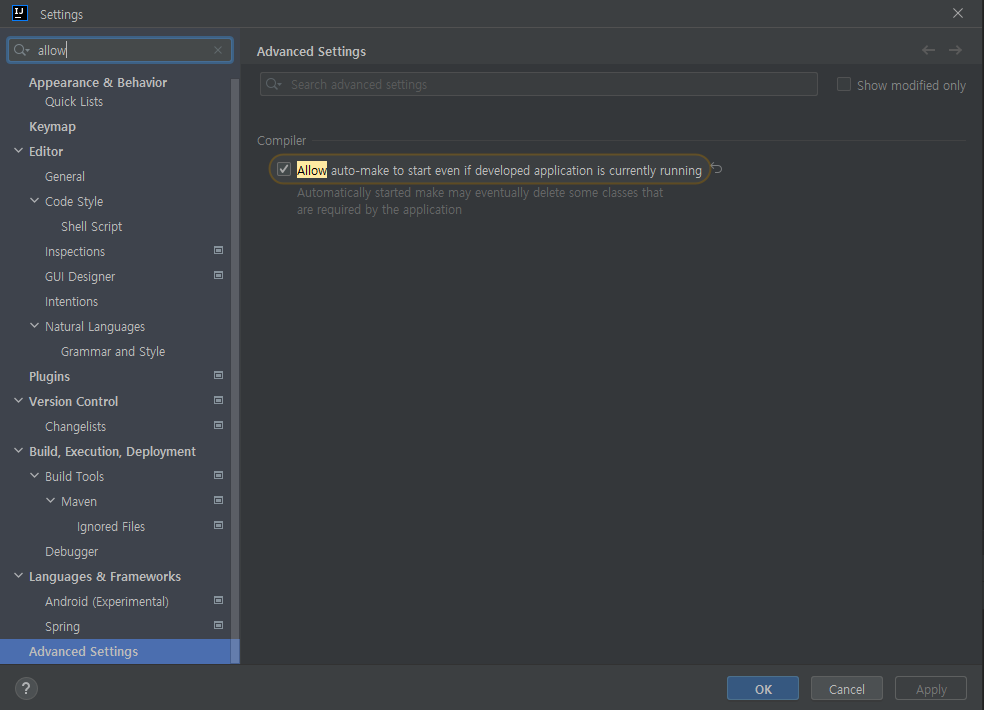
이것도 그냥 검색창에 allow auto~ 검색하면 바로 찾기 수월하다
추가로 3번 내용 체크는 현재버전의 인텔리제이와 예전버전의 인텔리제이가 좀 다른걸로 알고있다
예전 버전에선 위에 작성한 부분이 아닌
Registry > compiler.automake.allow.when.app.running 를 체크하면 되었다
버전에 따라 다르니 3번 내용이 없으면 Registry를 확인해보자
'DevTools > IntelliJ IDEA' 카테고리의 다른 글
| Intellij에서 함수가 한줄로 보이는 현상 수정하기 (0) | 2022.08.04 |
|---|---|
| Intellij의 .http 파일을 통해 요청 보내보기 (0) | 2022.06.27 |
| IntelliJ에서 주석 ( Ctrl + / ) 시 코드 바로 앞에 되도록 설정 (0) | 2021.10.28 |


